“I am fortunate (!) to be an administrator for one of our [tools] and received a request to add some new custom fields to one of the projects in that tool. I first had to define the fields (name, data type, etc.) then somewhere else in the admin UI, I had to configure where this field would appear on the test case form for the project. Then somewhere else again in the admin UI, I had to define the set of possible values for the dropdown fields I’d added. [. . . ] infuriating (and requires a re-learn [of] this ridiculousness every few months when I get such admin requests).”
A tool can look appealing and pass basic usability tests but still fail under long-term use — because of maintenance problems, poor integration, or simply because it doesn't match how testers actually think and work. Superficial attention to usability can even make things worse, by making tools *saleable* without making them genuinely useful.
In my last article I discussed how testers’ experiences with their tools had an emotional impact on them, affecting their lived experience of their work, and the ways those emotions around tools and automation affect motivation. I called this TX: the testers’ lived experiences of tools and automation. What would improve TX? Is it improving the usability, as I thought before starting the research? The research showed that usability is necessary, not sufficient, and sometimes misunderstood, even a blocker to a good TX.
I’m going to describe test tools and automation as “Tools to support testing” and abbreviate that in this article to TsST.
I collected data over approximately one year through four surveys and two workshops, plus expert interviews and 111 survey responses were analysed. Participants came from many countries across Europe, Americas, Asia and Australasia, and represented a wide range of demographic, professional backgrounds and job roles.
Over 90% of the research participants mentioned usability, technical and organisational challenges to successful TsST usage. Digging deeper into the usability and technical challenges uncovered how usability and technical comments could be mapped against the quality attributes we use to assess software and led to identifying the Illusion of Usability. In this article, I will explain the illusion of usability, identify some specific illusions, and look at how to overcome them.
What the Data Showed
An analysis of these practitioner stories revealed a clear split across key quality attributes, mapping directly to everyday workflow frustrations. I used text mining for word frequency, and thematic analysis, with additional checks of the results using MS Azure sentiment analysis and expert interviews and reviews. I looked at the usability attributes (operability, learnability, user goals, UI aesthetics, context, and satisfaction) and at technical attributes (functional suitability, performance, compatibility, reliability, security, maintainability, and portability). The totals for each of these attributes are in Table 1, while Figure 1 just shows the frequency of comments by attribute from most to least. Notice there is a massive gulf between how much people care about the operability of their TsST, and the UI aesthetics. You will see there were also comments about management and organisational challenges, and that only 29 participants did not mention issues.
Table 1: Participant Comments by Category*
Category | Number of Participants | Frequency of Comments | Examples |
|---|
Usability |
— Operability | 93 | 250 | Easy, difficult, usable, help, learn, UI, flexible |
— Learnability | 54 | 125 |
— User goals | 32 | 97 |
— UI aesthetics | 26 | 33 |
— Context | 22 | 34 |
— Satisfaction | 12 | 24 |
Technical |
— Portability | 57 | 138 | Installation, environment, integration |
— Performance | 50 | 102 |
— Maintainability | 46 | 68 |
— Functionality | 47 | 57 |
— Security | 26 | 46 |
— Compatibility | 28 | 39 |
— Reliability | 12 | 16 |
Other |
Management / Organisational | 101 | 377 | Motivation, value for money, time/staff/budget, vendor service |
Issues and challenges | 82 | 232 | 29 participants did not raise issues |
*(This table is drawn from the paper's Table I. Participants are not double-counted within categories, but may appear in multiple categories.)
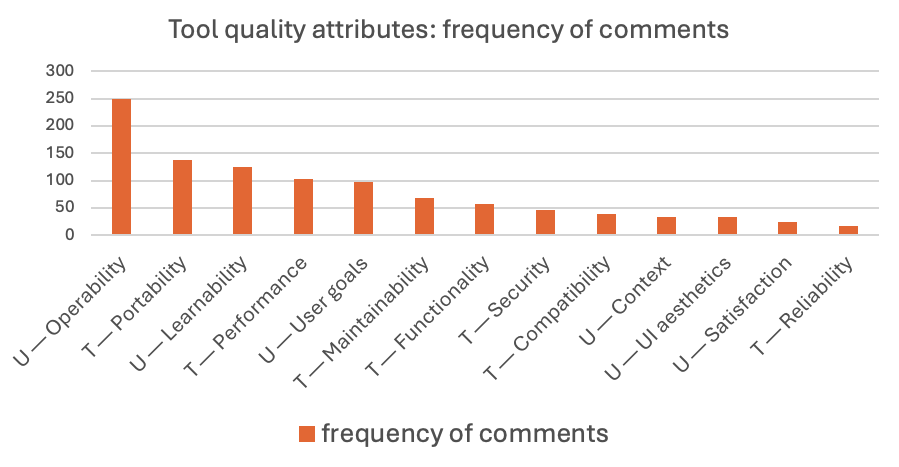
Figure 1: TsST quality attributes – frequency of comments
You can see that the usability sub-attribute of Operability was top of the list during the analysis both for the number of participants and for the frequency of the comments made. Operability is about consistency, user control, error prevention, protection from mistakes, simplicity: the things that help someone achieve their goals in their workflow. It was more important to the participants when thinking about their TsST than the functionality or the UI aesthetics, by a long way. In fact, when UI aesthetics were mentioned, it was to complain that a pretty interface doesn’t help support getting your work done… Operability is what is needed. Look at the quote at the top of the article, how many places where the unfortunate tester could slip up, forget to do a step, get lost… that interface offered the opposite of operability.
The second most frequently mentioned attribute is one of the technical ones: Portability. This is about how adaptable software is to be transferred into different systems, onto different hardware. It includes installability, replaceability, and adaptability.
“Every time I have to deal with a new tool, it’s the matter of installation that is the most difficult. For some reason, everybody who develops tools [prepares] YouTube video[s] about how to use the tool but not how to install it.”
This attribute emerged not just at this point in the research, but also in expert interviews and case studies, with participants commenting on how hard it is to install TsST, joking about how they work “while the consultants are in the building” and also noting that in tooling strategies we don’t think hard enough about how long a tool will be used, and what the succession strategy is for the TsST when the technology around it (the system under test) changes.
The third most frequently mentioned attribute was learnability. Here there was a difference in view between managers—who wanted tools to be fast to learn and require no training—and test practitioners who wanted to invest in learning skills that could be applied long term. There is—no doubt—a conflict in understanding and expectation about long and short-term gains with TsST and automation learning. For some testers, they just want to get on with the job in hand; learnability supports that.
“That I can quickly get to testing without having to waste time learning the tool, or how the tool wants me to do it.”
In the workshops I ran, practitioners placed examples of tools they had used on a matrix of usefulness against learnability (Figure 2). There were TsST which were easy to get started with, but which in the long run were less supportive of advanced work. In contrast, some TsST tools were harder to learn, but were more useful, enabling greater flexibility and stronger testing when mastered. The worst cases were TsST that were hard to learn, and then not useful—shelfware that was expensive in implementation and training costs, with no perceived benefit to the testers. An ideal, of course, would be tools that are easy to learn and also support testing in a useful way, long term.
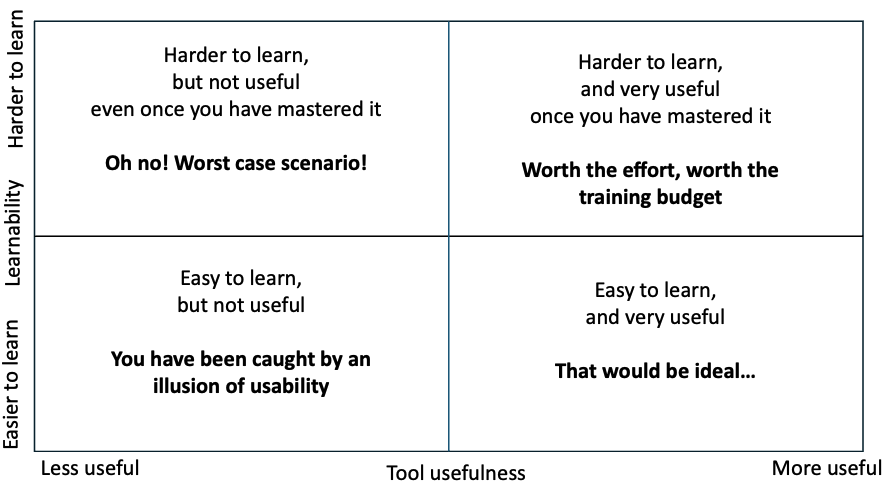
Figure 2: Matrix of tool usefulness again tool learnability
One of the ways that some of the TsST disappointed was in their overall quality of use, that is, not just their usability, but how all the quality attributes work together to enable someone using a tool to work efficiently, effectively, meet their goals with freedom from risk, and the ability to use the tool successfully in their context. They need to be satisfied not just with the usability, but also with performance, security and so on. We can see from Table 1 and Figure 1, that attributes other than usability (portability, maintainability, performance and so on) were also important to the participants, and caused problems. If the learnability of a tool is high, but it then doesn’t deliver over time, this is almost worse than low learnability, because high initial expectations are dashed. These results led to a discussion of the illusion of usability.
The Unexpected Finding: Illusions About Usability
This research uncovered a core phenomenon I call the "illusion of usability": The belief that (1) usability is superficial (i.e. an attractive interface, single personas suffice, people do not grow and change), and (2) that usability is the same as quality in and sufficient for a good user experience.
There are three main illusions:
- Focusing on an attractive interface
- Focusing on a single user group
- Neglecting to support change and growth.
Usability and its sub‐attributes were the most mentioned across the data, whether as desirable attributes of a TsST, or the lack of the attribute causing issues. However, an interesting outcome of the analysis was that it became evident that what frustrated them most was not a lack of usability but superficial usability improvements that made the interface more attractive, and potentially more marketable, without improving the workflow or the overall UX of the tool. Operability was the most mentioned usability sub‐attribute, and UI aesthetics was generally only mentioned as a negative:
“… update was really cool but everything looked different and was a little hard to find. ... My understanding of the updates, caused me to revert back to the previous version…”
“… looks cool, could be used more properly, but… took time to set up, lack info online, user‐unfriendly UI in configuration. Not all configured things worked. Average but bad for the price…”
1. Usability Focused Mainly on an Attractive Interface
User interface aesthetics were only mentioned by participants negatively, an irritation if not delivered, and an irritation if the aesthetics masked failure to deliver true support for testing. Looking at the results from the survey and interviews equating usability with a pleasant-looking screen and easy initial onboarding is a set up for failure. However, one interviewee raised the point that usability, together with an attractive UI and easily accessible help for the tool, makes it marketable. Survey respondents reported frustrations with this. Initial adoption/learnability can look easy, but disguises longer‐term problems with maintainability, configuration, portability and integration with other tools. Participants confirmed that tools can look appealing and be easy to start using, while hiding serious longer-term problems with maintenance, configuration, and integration with other tools:
"running the tests is quite easy… The difficult part is maintaining the tests when [they grow] massively."
"looks cool… but… took time to set up, lack info online, user-unfriendly UI in configuration."
2. Toolset Designed with Only One User Group in Mind
It became clear that TsST are often built with a single type of tester in mind, which means they fail other testers. Sometimes this is because the tool designer or builder has a stereotypical tester in mind, and sometimes because in the words of one participant “I just built it for myself”—a reasonable approach if you are the only person using that tool, but flawed if other people are to use the tool. The research found that both highly technical users and less technical users reported usability problems—just different ones. It also became clear that workflow changes mandated by tool changes were not welcome, particularly if this resulted in a loss of autonomy:
"Some of the early design choices were made to make it easier to use for less technically competent testers. For those of us with strong coding backgrounds, it can occasionally be difficult to accomplish what we want."
"It was a lot of effort learning about the tool. The tool was initially built for developers with a small element for testers."
“Supports your workflow vs forcing you to change. People [are greater than] process/tools”
For the specific tool set around test automation, for success, more than one skill set is required. All the expert interviewees emphasised the need for discipline, roles and rigour—a craft process—for test design and automation. One talked about automators serving the testers: “[their] job is to press the keys for me.” This was echoed by an expert automator: “I was just a conduit for [the Subject Matter Expert] to run their tests”, who also discussed the need for treating tool and automation projects as difficult software development projects. The automation “has to dance along with the system under test …it’s incredibly complex.” They concluded that TsST builders need to stop, analyse and “test [the automation]”.
In discussing this with my fellow researchers (Chris Porter and Mark Micallef), I began to wonder if there is a real understanding of the personas for testing; not just the job titles of people who have the roles and will use the TsST, but their communication styles and information needs, their preferences for tools.
3. Neglecting to Support Change and Growth
Usability is a necessary factor for long‐term successful TsST adoption. However, the overall quality in use of the tools is affected not just by usability but by quality in use attributes. I will introduce two useful terms here that describe aspects of hard to use tools: viscosity and seamfulness.
Viscosity is a maintainability descriptive for difficulty in changing something: code, configurations, testware, automation suites, any artefacts that you need to change. A viscous experience indicates that maintaining changing testware over time becomes harder.
Seamfulness is an operability descriptive for difficulties in different tools, parts of a process or system areas working together, sharing data/information, transferring control and so on. A seamful experience with tools would be the opposite of a seamless experience; nothing is going smoothly.
Participants’ responses indicated that flexibility (built from reducing viscosity and increasing maintainability of the code) as well as technical attributes such as installability, performance, and portability directly affected the usefulness of tools and their experiences of their TsST.
The systems we are testing will change and grow, so your TsST tools must support the ongoing growth of your test suites without added viscosity. New tools will be introduced, and teammates will use different tools; the tool set needs to provide a seamless experience for everyone.
Further, the people doing the testing will change and grow; this is related back to learnability. A good tool that is satisfying to use will allow a person to increase their skill level with the tool, and with testing, and still support them satisfactorily. My analogy for this is a pianola (a self-playing piano using paper rolls) which is easy to operate immediately but limits what you can do. A piano takes time and effort to learn, but ultimately gives far greater capability and flexibility. Some test tools are designed like pianolas—easy for a beginner but limiting for experts. Others reward investment of time and skill. Neither approach suits everyone, and neither should be assumed to be universally correct.
The three illusions tell us that usability is necessary but not sufficient.
Overcoming the Three Illusions of Usability
Whether you are a tool designer, a tool vendor, or someone evaluating a tool, there are actions you can take to help you overcome the illusion of usability.
One relatively easy action is to apply Nielsen's 10 Usability Heuristics when assessing the tool interface, but remember this assesses the interface which is part of but not the only contributor to the testers’ experience of the tool, and that the interface itself was not the key issue that surfaced.
To really engage with looking beyond the surface-level UI design and supporting real work processes, workflows, and long-term use, you need to understand who is using the tool, why they need it and the context within which it will be used. If you have a UX designer available, you could ask for their help. Certainly, whether you are building or acquiring any sort of tool to support testing, treat this as a proper software project, taking time to think about why it is needed and who will be using it. Dot Graham’s work with various authors on Test Automation Experiences and Test Automation Patterns, and articles by Baz Dijkstra, among others may help you if you are specifically looking at automation.
I did two things to help me understand and address the illusions:
- First, I carried out a survey of testers to help understand who actually is testing and using tools to support their testing. The results showed that testers are far from stereotypical IT people: this helps with understanding tester personas. I will explain those findings in the next article in this series.
- Secondly, I developed and trialled in industry a framework of 12 heuristics questions and activities to help get answers to the Why, Who and Context questions. This is the idea-t framework: influencing the design evaluation and acquisition of tools to support testing, which I will explain in a later article in the series.
In the next article: I will deep dive into stereotyping of IT people and testers, sharing the results of the “who is testing?” survey, and what that means, for tool design, and for the industry. I will share with you some insights I had into persona development to help overcome the illusions of usability.
Key terms
- TX: The Testers' Lived Experience of Tools and Automation—the research concept developed across these papers.
- LX (Lived Experience): The full impact of technology on a person's daily life, beyond immediate task use (after Porter, 2015).
- UX (User Experience): All aspects of a user's interaction with a product and its provider.
- Usability: Effectiveness, efficiency, and satisfaction with which a user achieves goals in a given context
- Quality in Use: A broader concept from ISO 25010: does the tool actually help users achieve their real goals? Includes usability but also flexibility, freedom from risk, and other attributes.
- UI (User Interface): The visual screens, buttons, and layouts a person interacts with.
- Viscosity: How hard it is to make changes to code or tests within a tool. High viscosity means small changes require a lot of effort (see T. R. G. Green and M. Petre, "Usability analysis of visual programming environments: a 'cognitive dimensions' framework," Journal of Visual Languages & Computing, vol. 7, no. 2, pp. 131–174, 1996. And M. Petre, "Why looking isn't always seeing: readership skills and graphical programming," Communications of the ACM, vol. 38, no. 6, pp. 33–44, 1995.).
- Seamful tools: Tools where you can see the "joins" — you have to use several different tools together, and managing the gaps between them adds extra work.(see T. R. G. Green and M. Petre, "Usability analysis of visual programming environments: a 'cognitive dimensions' framework," *Journal of Visual Languages & Computing*, vol. 7, no. 2, pp. 131–174, 1996. And M. Petre, "Why looking isn't always seeing: readership skills and graphical programming," *Communications of the ACM*, vol. 38, no. 6, pp. 33–44, 1995.)
- Shelfware: Tools acquired by organisations but not put into use (see "Testware or Shelfware" - The reality; and Avoiding Shelfware: A Managers’ View of Automated GUI Testing).
- TsST: Tools to Support Software Testing — any tool used in testing activities.
- HCI: Human-Computer Interaction—the research field studying how people interact with technology.
- Persona: A fictional but realistic profile of a typical user, used in design to represent the needs of a group of people.
- ISO 9241 / ISO 25010: International standards for usability and software quality.
- Mixed methods: The method used for this research, an approach combining quantitative (e.g. surveys, frequency counts) and qualitative (e.g. interviews, thematic coding) methods.
Isabel Evans’ Papers
- Paper: Evans, I., Porter, C., Micallef, M., and Harty, J. (2020). "Test Tools: An Illusion of Usability?" In *2020 IEEE International Conference on Software Testing, Verification and Validation Workshops (ICSTW)*, IEEE, pp. 392–397. DOI: 10.1109/ICSTW50294.2020.00070
- The authors for the paper on which the article is based are Isabel Evans (University of Malta), Chris Porter (University of Malta), Mark Micallef (University of Malta), Julian Harty (Open University). It was presented at TAIC PART 2020 — Testing: Academic and Industrial Conference — Practice and Research Techniques, held as part of ICSTW 2020. The anonymised dataset is available at OSF (Open Science Framework)
- Evans, I., Porter, C., Micallef, M., and Harty, J. (2020). Stuck in Limbo with Magical Solutions: The Testers' Lived Experiences of Tools and Automation. *VISIGRAPP 2020*, 195–202.
- Evans, I., Porter, C., and Micallef, M. (2021). Scared, Frustrated and Quietly Proud: Testers' Lived Experience of Tools and Automation. *ECCE 2021*, Siena, Italy.
- Isabel Evans PhD Dissertation “A Framework to Support Test Tool Design and Acquisition”
A full list of references for the original papers includes work on test automation by Dot Graham, Seretta Gamba, and Baz Dijkstra, and on test tools by Julian Harty, as well as academic papers on choosing tools, flaws with developer tools and productivity of developers.





Lets Hang!