Modern QA teams often struggle to turn test failures into actionable insights when data is scattered. By adopting an evidence-first workflow using native cloud services, teams can centralize artifacts, automate failure summaries, and leverage historical data to resolve the "flaky test" debate while building cross-functional trust.
Most QA teams know the feeling: it is Monday morning, 50 tests have failed overnight, and no one can immediately tell whether the problem is in the product, the test data, the environment, or the pipeline itself. The hardest part is often not rerunning the tests. It is gathering enough evidence to understand what actually happened.
Many teams run their products on AWS, but QA evidence and debugging signals still end up scattered across chat threads, local folders, and third-party tools. When a test fails, the slow part is rarely rerunning it. The slow part is turning a failure into actionable evidence: the run link, the environment, the exact timestamps, the key logs, and the artifacts required for reproduction.
An evidence-first workflow shortens that loop by treating artifacts and signals as first-class outputs of testing. Just as importantly, it helps preserve trust between QA and development. When QA cannot quickly provide clear, complete evidence, debugging slows down and confidence in the testing process starts to fray. The examples below use AWS services, but the same architectural pattern maps cleanly to other clouds. For example, Azure can use Blob Storage, Azure Monitor or Log Analytics, Azure Functions, and Event Grid. Google Cloud can use Cloud Storage, Cloud Logging, Cloud Functions, and Pub/Sub.
The Anatomy of Friction: Why Evidence Recovery Fails
Most debugging friction comes from one gap: the time between “something failed” and “here is the complete evidence package.” When evidence is incomplete or spread across systems, failures turn into ad hoc detective work. In many teams, this is less a people problem and more a system design problem. This challenge has become more visible as QA practices increasingly move toward shift-right testing and stronger observability, where fast access to production-like evidence is essential.
A typical failure loop looks like this:
A test fails in CI.
QA shares a screenshot and a short error message, often without a run link, build number, or exact timestamp.
Developers ask for context: correlation or request IDs, environment details, payload context, and the full report.
QA searches across tools, chat history, and local folders to collect missing artifacts.
Someone pulls logs later and posts a snippet without full context.
Another round of discussion follows to interpret partial data.
This loop is common because most pipelines optimize for execution, not for evidence packaging and retrieval.
Teams can start small by targeting four outcomes:
One link per run that anyone can open
Faster answers to “what happened” without waiting on another team
Timely, bounded notifications instead of late surprises
Flaky tests measured with history, not debated from memory
Outcome
Primary AWS Service(s)
How the Service Supports the Outcome
One link per run that anyone can open
Amazon S3
Stores all run artifacts under a single runId so reports, screenshots, logs, and metadata stay in one place.
Faster answers to “what happened” without waiting on another team
Amazon CloudWatch + Amazon S3
Combines log visibility with stored run artifacts so QA and developers can quickly correlate failures, timestamps, and environment details.
Timely, bounded notifications instead of late surprises
Amazon SNS + AWS Lambda
Uses Lambda to summarize failures and SNS to deliver concise alerts or daily updates to the right audience.
Flaky tests measured with history, not debated from memory
Amazon S3 + AWS Lambda
Stores run history in S3 and uses Lambda to calculate flake rates and trends over time.
The Workflow at a Glance
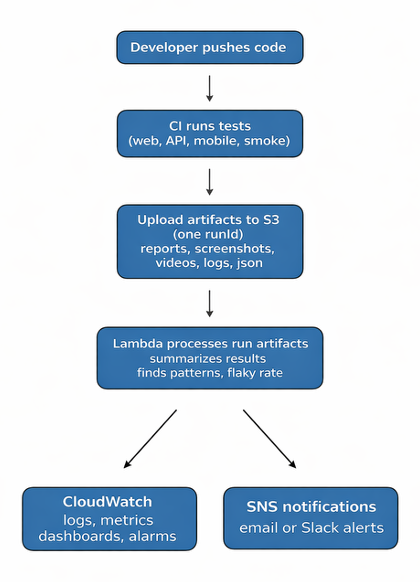
This workflow relies on four AWS native services that many teams already have in place:
S3 stores run artifacts in a consistent structure.
CloudWatch provides shared log visibility and fast correlation.
SNS sends bounded notifications that arrive on time.
Lambda automates summaries and lightweight analysis, including flaky test detection.
Figure 1. Evidence-first QA workflow: each CI test run uploads artifacts to S3, correlates signals in CloudWatch, triggers a Lambda summary, and publishes notifications through SNS.
S3: One Home for QA Evidence
If teams do only one thing from this article, start here.
S3 works best when it becomes an evidence cabinet for QA: a single, reliable place where every artifact from a test run is stored in a consistent structure, with predictable naming and long-lived history. Instead of chasing screenshots in chat, reports in CI, and logs in separate tools, teams can return to one runId and find the full record of what happened. Use that runId as the anchor for every run and store all artifacts under one prefix. The goal is simple: one run prefix that contains the entire story.
Common artifacts to store per run:
Test report (HTML, Allure, JUnit XML, or another format)
Screenshots and videos
Raw automation logs
metadata.json that captures what matters for debugging
If teams want to open HTML reports directly from S3 in a browser, they may need to enable Static Website Hosting or upload the file with the correct Content-Type header, such as text/html. Otherwise, the browser may download the file instead of displaying it.
With this structure, bug reports can link to one run prefix instead of attaching partial screenshots. QA leads can access run history for regression analysis, trend reviews, and release retrospectives. S3 being boring and reliable is exactly what QA evidence needs to be.
CloudWatch: Stop Waiting for Answers
CloudWatch turns “please check logs” into shared visibility. With read access to the right log groups and dashboards, QA can pull actionable context such as timestamps, correlation IDs, stack traces, latency spikes, and error rates. Even a basic filter on a correlation ID can save a long back-and-forth.
CloudWatch helps in three everyday scenarios:
Production reports with missing context - User reports are often incomplete. With logs, QA can search by timestamp, user ID, endpoint path, request ID, or correlation ID to reconstruct the trail.
“Works on my side” conversations - When UI symptoms differ across machines, logs help the discussion focus on system behavior: retries, timeouts, throttling, partial failures, and permission issues.
Trend spotting without drama - Dashboards provide a calm shared view: error rate, latency, spikes, throttling, queue backlog. Not as a wall of graphs, but as a source of truth when behavior changes.
A practical permissions model keeps access safe and useful:
Junior QA: read-only access to CloudWatch dashboards and relevant log groups
Senior QA or SDET: CloudWatch read plus S3 upload access for artifacts
Managers: IAM visibility and approvals, not daily console actions
SNS: Notifications That Arrive on Time
SNS keeps failures from hiding. Notifications work best when they are predictable and bounded, not noisy.
Two notification types are usually enough to start:
Quality alerts - Notify when a critical smoke suite fails or when failure rate crosses a threshold.
Daily summary - A short message that says what ran, what failed, and what changed.
A good alert includes three things: what failed, where to look, and whether it is urgent.
Example message:
Smoke failed in staging. runId 2026-01-28-1452. 7 failures. Top error: 502 on /checkout. Evidence: <S3 link>. Logs: <CloudWatch link>.
SNS supports fan-out: one publish action can notify email, chat integrations, or downstream systems later without changing the publisher.
While SNS handles the delivery of information, AWS Lambda provides the intelligence behind the message.
Lambda: Where the Workflow Becomes Smart
Lambda adds automation and lightweight analysis on top of evidence stored in S3. A highly effective trigger is the upload of the metadata.json file under a run prefix. This S3 Object Created event can invoke a small Lambda function that acts as a digital courier, reading metadata, parsing results, and translating raw run data into a short human-readable summary or SNS alert.
A minimal Lambda summary can:
Read metadata.json
Parse a test results file
Count failures and group by suite or area
Publish a concise summary to SNS
Optionally store aggregated metrics for trends
High-Value Use Case: Flaky Test Detection
Flaky tests erode trust in the pipeline because teams stop believing red builds. If S3 stores run history, Lambda can compute flake rates over a rolling window (for example, the last 30 days) and produce a simple report:
Per-test failure rate across the window
Top flaky tests and top flaky areas (for example: login, search, checkout)
Trend changes week-over-week so the team sees whether stability is improving
This shifts the conversation from gut feel to data. It also makes prioritization straightforward: fix the worst offenders first, such as timing waits, unstable data, shared accounts, and async flows that are not being polled correctly.
Common Mistakes to Avoid
Implementing everything at once - Start with S3 and CloudWatch. Add SNS and Lambda after the basics are stable.
All-or-nothing access - Avoid giving QA zero access or full admin access. Start narrow and expand based on workflow needs.
No naming convention - Random S3 prefixes become another mess. Agree on runId and structure early.
Unlimited notifications - SNS can become noisy fast. Start with critical alerts and one daily summary, then tune thresholds based on feedback.
A One-Week Starter Checklist
Provide QA read-only access to CloudWatch logs and dashboards for relevant environments.
Create one S3 bucket or a clear prefix for QA run artifacts.
Update CI so every run uploads report, screenshots, and metadata.json under one runId.
Add a small Lambda that is triggered by the metadata.json upload and publishes a short summary.
Send the summary to one SNS topic connected to email or chat.
After 2 to 4 weeks of history, add a Lambda job that calculates flake rates over the last 30 days.
Closing Thought
The goal is not “QA learns AWS.” The goal is that QA evidence and signals become reliable, searchable, and shareable. If the product runs on AWS, the fastest path to evidence is often already available. Start with one workflow, clear permissions, and disciplined artifact capture. The same principles translate to other cloud platforms as well.
Anna Kovalova is Co-founder and CEO of Anbosoft LLC, a California-based software testing and QA services company. She has 15+ years of experience in QA leadership, test strategy, and automation for startups and enterprise teams. Her areas of focus include AI-assisted QA audits, risk-based testing, and reliable release readiness. Anna mentors in the tech community and writes on AI and software quality.





Lets Hang!