A Problem Every QA Team Faces
Every QA team I’ve worked with knows the pain of writing end-to-end browser tests: they’re tedious to script, brittle in practice, and all too easy to break when the application changes. I remember spending half a sprint just writing a handful of login-and-navigate tests—only to discover on maintenance day that one tiny CSS tweak in the UI had caused twenty-five assertions to fail. By then, the backlog of failed tests had grown so big that we started ignoring failures. This led to us losing confidence in the entire suite.
This isn’t just my story. A 2023 industry report found that teams spend up to 30 percent of their test automation effort wrestling with flaky or outdated tests—time that could be spent building features or delivering value to customers [1]. When test creation becomes an issue, release velocity slows, morale suffers, and quality takes a backseat.
What if you could describe a test in plain English—“Log into our app, navigate to the dashboard, and verify the welcome message” and instantly receive a fully functional browser script? And what if that same system could run the test, log the results, and even suggest fixes when things go wrong?
In this article, I’ll show you how to build exactly that—an AI-powered assistant that turns simple prompts into reliable end-to-end tests, frees your team from repetitive scripting, and restores confidence in your automation suite.
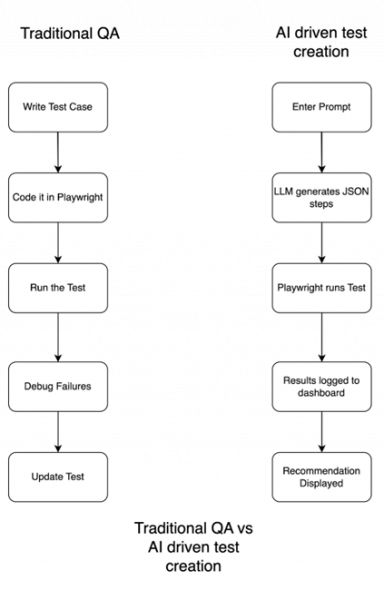
The Vision: One Prompt → End-to-End Test Run
Imagine this: instead of coding a browser test from scratch, you open a prompt box and type: “Go to the login page, enter email and password, click submit, and verify the dashboard heading is visible.”
Seconds later, you get back a fully formed test script. It’s already been executed, the result logged, and if it failed—an AI assistant has explained why, with a suggested fix.
This isn’t just a theoretical tool. I built it using a combination of low-code automation (n8n), a large language model (LLM), and a lightweight Python-Flask dashboard. I call it PromptPilot—because it takes the wheel for your QA flows, with nothing more than a prompt.
The system is modular:
- The LLM parses your intent and produces Playwright-style JSON test steps.
n8n handles orchestration, from prompt submission to test execution. - Playwright runs the test on a headless browser.
A Flask dashboard logs and displays results in real time.
The result is a dramatic shift in QA work—reducing manual toil and lowering the skill floor for authoring high-value tests. It’s not a replacement for thoughtful QA—it’s a booster for velocity, coverage, and rapid feedback loops. According to Forrester, AI-augmented development is already transforming test automation across enterprises, increasing speed and reducing manual test authoring by up to 50% [2].
Architecture Breakdown: How PromptPilot Works
To turn a single prompt into a fully executed test case, I built a modular, low-code architecture using open tools and lightweight infrastructure.
Key components:
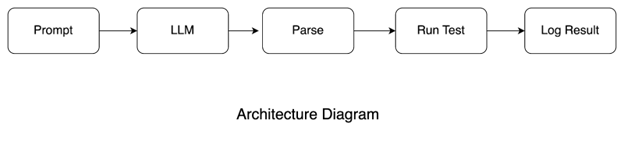
- Prompt Ingestion & Orchestration (n8n)
I used n8n, a low-code automation platform, to design the flow. The user submits a natural language prompt (e.g., "Test the login flow with invalid credentials"). n8n manages the handoff to the LLM and downstream steps. It offers a visual way to build/debug flows and integrates HTTP, file handling, and conditional logic.
- Test Generation (LLM)
The LLM (e.g., GPT-4) receives the prompt and returns structured JSON with test steps: actions like "goto", "fill", "click", or "assert_text" and relevant selectors/values. I guide the LLM to generate Playwright-compatible output.
- Test Execution (Playwright + Python)
A Python runner parses the JSON and uses Playwright to run headless browser tests, capturing pass/fail and errors.
- Result Logging (Flask Dashboard)
Test results are POSTed to a Flask API and stored as JSON. The frontend dashboard reads and displays recent test runs, highlighting failures in red and passes in green.
Prompting the AI to Write Playwright Tests
The core is translating plain English prompts into structured test steps. I designed a prompt format enforcing a strict JSON schema with actions like "goto", "fill", "click", "assert_text" and necessary parameters.
Sample prompt:
"Test the login flow by entering an invalid email and verify the error message is shown."
Sample LLM output:
[
{"action": "goto", "target": "https://example.com/login"},
{"action": "fill", "selector": "input[type='email']", "value": "[email protected]"},
{"action": "click", "selector": "button[type='submit']"},
{"action": "assert_text", "selector": ".error-message", "value": "Invalid email address"}
]
This structured format simplifies parsing and execution.
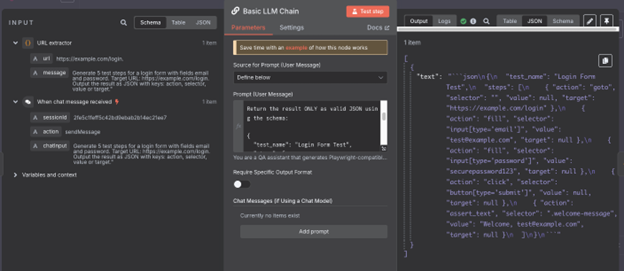
To improve accuracy and reduce hallucination, I added a system prompt instructing the LLM to respond only with valid JSON and used few-shot examples. The selectors are generated out-of-the-box based on the model’s understanding of common HTML and DOM patterns (e.g., input[type='email'], button[type='submit']).
For more precision, I sometimes guide the LLM by including selector hints in the prompt or providing example selectors. This avoids the need for custom model training while ensuring the generated steps align closely with real UI structures.
For dynamic UIs where selectors change frequently, I often regenerate tests through the LLM rather than manually updating individual selectors—this allows me to quickly refresh definitions without rewriting entire test scripts.
While not perfect (LLMs are probabilistic), this approach enables automated test generation for 80–90% of simple scenarios with minimal manual fixes.
Running and Logging the Test
Once the LLM outputs JSON steps, a Python backend using Playwright performs browser interactions sequentially—navigation, filling, clicking, and assertions.
To trigger tests, n8n sends a POST request to a Flask endpoint (/run-tests) with the JSON payload.
if action == "goto":
page.goto(target)
elif action == "fill":
page.fill(selector, value)
elif action == "click":
page.click(selector)
elif action == "assert_text":
assert value in page.inner_text(selector)
Playwright’s synchronous API mimics real user behavior—waiting for selectors, handling delays, and detecting assertion failures.
Test metadata (test name, pass/fail, timestamp, error messages) is stored as JSON. A Flask-based dashboard reads and renders the last 10 test runs and highlights failed tests in red.
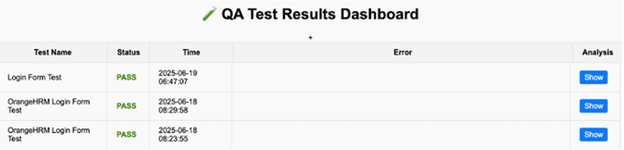
This real-time dashboard was vital for quickly understanding test outcomes and launching the next workflow: AI-powered self-healing for flaky tests.
Bonus feature: I added a “Show Analysis” column linking to /recommendation, where the AI provides natural language diagnosis and fixes for failing tests.
Benefits — Speed, Accessibility, Velocity
Building this AI-powered assistant transformed how I write and maintain browser tests.
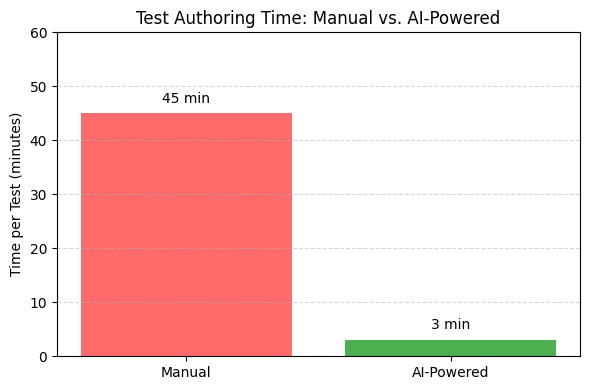
Speed: Generating Playwright tests now takes about 3 minutes of AI output time, plus an additional 2–3 minutes for manual review and minor edits when needed. Even factoring in this review step, it’s still a significant drop from the 30–60 minutes I previously spent scripting each test from scratch. Describing intent in plain English frees me from coding selectors or debugging waits, resulting in an overall reduction in authoring time of over 80%—saving days each sprint.
Accessibility: Since input is plain English, non-technical teammates—product managers or QA analysts—can describe flows and get tests back, democratizing coverage and fostering collaboration.
Velocity & Experimentation: Rapid generation encourages exploring alternate flows and edge cases, boosting test coverage and confidence to make changes faster.
According to McKinsey, teams using AI-assisted test generation see 2–5x increases in test coverage and 40–60% reductions in manual test maintenance over six months [3].
Limitations and What’s Next
AI assistance isn’t perfect—especially in browser automation where reliability is critical.
Accuracy Challenges: About 10–15% of generated tests have errors—incorrect selectors, missing assertions, or assumptions about UI timing. I insert manual reviews and add explicit waits like waitForSelector() to mitigate these.
Flaky Test Detection:AI can analyze failure logs and recommend fixes, e.g., adding waitForSelector() for async loading. This helps catch timing issues but struggles with race conditions or environment-specific bugs.
What’s Next:
- Integrated Assertions: Inferring richer validations from prompt context.
- Automatic Selector Repair: Using AI to detect and fix selector breakages.
- CI/CD Integration: Plugging into GitHub Actions for live feedback on pull requests.
Conclusion: Rethinking QA Through AI Assistance
Writing and maintaining end-to-end tests has always been tedious—often resulting in brittle tests that break with even minor UI changes, like a CSS tweak, eroding confidence in automation. While this AI-powered workflow primarily tackles the bottleneck of slow test creation, it also begins to address brittleness by making regeneration of tests fast and painless.
With a plain-language prompt, I can regenerate or modify tests in minutes when selectors break, rather than spending hours manually refactoring scripts. In its current state, I still handle selector changes by re-prompting the AI to regenerate only the affected steps, rather than rewriting entire tests. This ability to rapidly repair broken steps significantly reduces the maintenance burden that once caused us to ignore failing tests.
For more complex reuse patterns, the JSON-driven approach supports modularity: I can define reusable "macro" steps like Login—a 5-step sequence encapsulated as a single reusable block—and call it across multiple tests. If a selector or flow changes, I only need to re-prompt or update that macro definition once, and every dependent test inherits the fix. This isn't fully automatic today, but it works well enough to keep maintenance low while the "Automatic Selector Repair" capability matures.
More than speed, this workflow restores confidence in test suites by reducing both creation and repair friction. It also opens the door for future enhancements—AI-driven selector healing and integrated assertions—that will further minimize brittleness. For teams bogged down by slow authoring cycles and fragile tests, AI-assisted testing offers an immediate, practical step forward.
References
[1] GitHub Staff, “Octoverse: The state of open source and rise of AI,” GitHub Blog, 8 Nov 2023, https://github.blog/news-insights/research/the-state-of-open-source-and-ai
[2] Diego Lo Giudice, “The Evolution From Continuous Automation Testing Platforms To Autonomous Testing Platforms,” Forrester Blog, 6 May 2025, https://www.forrester.com/blogs/the-evolution-from-continuous-automation-testing-platforms-to-autonomous-testing-platforms-a-new-era-in-software-testing/
[3] Sida Peng et al., “The Impact of AI on Developer Productivity: Evidence from GitHub Copilot,” arXiv (2023), https://arxiv.org/abs/2302.06590
[4] Owain Parry et al., “Empirically evaluating flaky test detection techniques,” Empirical Software Engineering (2023), https://eprints.whiterose.ac.uk/id/eprint/198846/1/





Lets Hang!